


Intel Xe Super Sampling 2 (XeSS 2) is a groundbreaking solution in the gaming world, combining three key technologies – XeSS-SR, XeSS-FG, and XeLL – to maximize frames per second (FPS), accelerating game performance while maintaining top-tier image quality and minimal latency. XeSS-SR leverages AI upscaling to deliver sharp details even at lower rendering resolutions, while XeSS-FG introduces smooth frame generation, enhancing animation fluidity without sacrificing quality. The key complement is Intel Xe Low Latency (XeLL), which intelligently reduces input lag, ensuring responsive gameplay on Intel Arc A-series and B-series graphics cards, as well as Arc 100V and 100T integrated graphics in Intel Core Ultra processors.
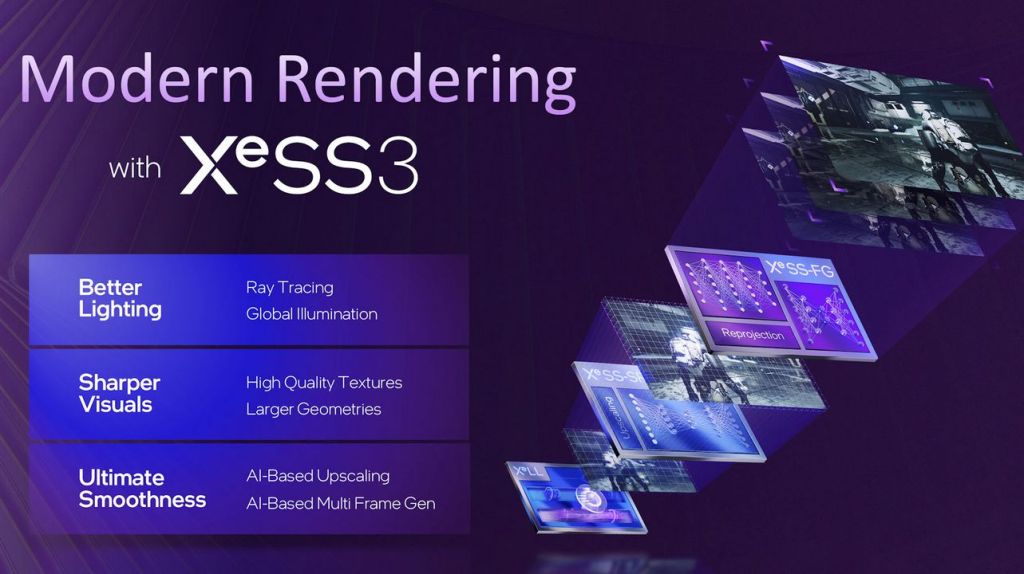
XeSS 3 introduces the ability to generate additional frames – up to 4x, meaning that for every rendered frame, three extra frames are created. The latest drivers enable this functionality not only on integrated Arc graphics in mobile processors, but also across all Intel Arc graphics cards – covering both the Alchemist and Battlemage series.
Comparison with competitors
Similar technologies from competitors are known as NVIDIA DLSS 4 (for GeForce cards) and AMD FSR 4 / Redstone (for Radeon cards). The quality of advanced upscaling and frame generation implementations largely depends on the specific game, though DLSS is often cited as the leader.
Key facts about Intel XeSS 2
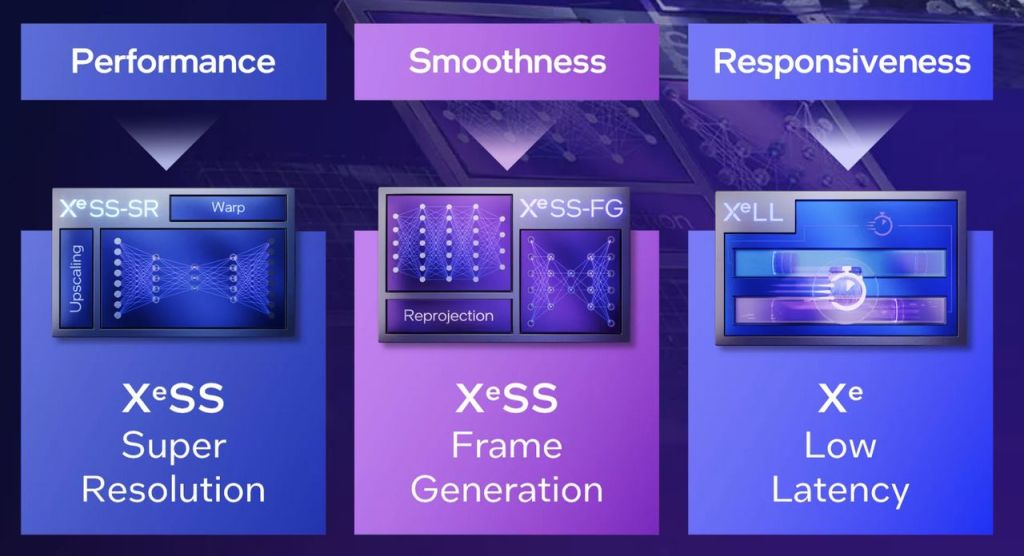
According to official Intel sources, XeSS 2 can boost game performance by 2-4 times compared to native rendering, which is especially noticeable in high-resolution games. For instance, tests in Diablo IV showed over a 4x FPS increase with XeSS-FG enabled. XeSS 2 consists of three core components:
Intel XeSS Super Resolution (XeSS-SR)
XeSS-SR is a frame-rate-boosting technology supported by Intel Arc GPUs and graphics cards from other brands. Using deep learning-based AI upscaling, XeSS-SR delivers higher FPS while preserving high image quality. XeSS-SR is also available for earlier generations of integrated GPUs and for hardware from other manufacturers that support Shader Model 6.4 (DP4A).
Intel XeSS Frame Generation (XeSS-FG)
XeSS-FG is an AI-based frame generation technology for games, exclusively supported by Intel Arc GPUs. It generates detailed, high-resolution frames through deep learning, improving game smoothness and performance without degrading image quality. XeSS-FG uses XeLL for frame synchronization support, which is crucial for a seamless player experience.
Intel Xe Low Latency (XeLL)
Equivalent to NVIDIA Reflex and AMD Anti-Lag, XeLL receives timing data for each frame, allowing it to calculate the CPU delay the application should introduce before starting work on the next frame. As a result, the time to display the frame on screen is minimized, reducing input latency. This additional, precisely calculated delay is tuned to reduce access time without impacting application performance.
Intel XeSS 3 with Multi Frame Generation (MFG) is here
The Intel Graphics Driver 32.0.101.8509 (WHQL) introduces support for generating multiple additional frames in games, not just on the latest Panther Lake integrated GPUs (Intel Arc B390 and Arc B370), but also on discrete Alchemist cards (Intel Arc A770, Arc A750, Arc A580, Arc A380, and Arc A310) and Battlemage cards (Arc B580 and Arc B570). Support also extends to integrated Arc graphics found in Meteor Lake (Core Ultra 100), Lunar Lake (Core Ultra 200), and Arrow Lake-H (Core Ultra 200) mobile processors.
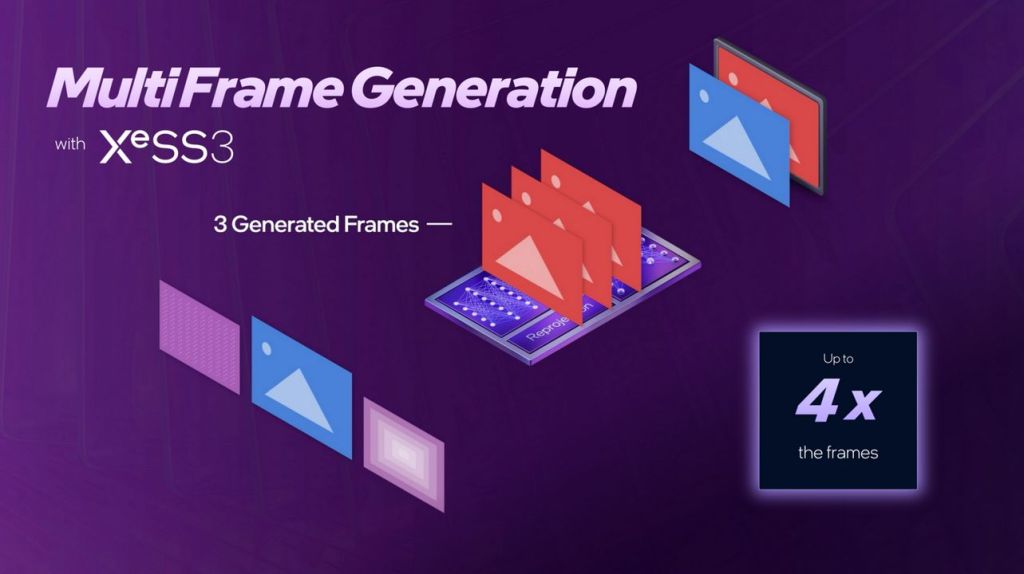
XeSS MFG can currently be activated through the Intel Graphics Software application. In games that already implement XeSS 2, users will find a new setting called XeSS Frame Generation Override, allowing them to select one of three frame generation modes: x2, x3, or x4.
It’s worth noting that this override option is not available in titles lacking XeSS 2 integration. Once a game officially supports XeSS 3, there will be no need to configure individual MFG modes manually within the Intel app – the system will handle everything automatically in-game.
List of games with Intel XeSS 3 support
- 1666: Amsterdam
- Assassin’s Creed Blackflag Resynced
- Assassin’s Creed Shadows
- Battlefield 6
- Crimson Desert
- Crisol: Theater of Idols
- Death Stranding 2: On the Beach
- Diablo IV
- Directive 8020
- Everwind
- F1 25
- Forza Horizon 6
- GOALS
- F2P
- Halo: Campaign Evolved
- Helldivers 2
- Japanese Drift Master
- LEGO Batman Legacy of the Dark Knight
- Medic: Pacific War
- Medieval Dynasty
- NARAKA: BLADEPOINT
- F2P
- Pit Panic
- Sid Meier’s Civilization VII
- The Mound: Omen of Cthulhu
- Yar: Forgotten Throne
List of games with Intel XeSS 2 support
- Achilles: Survivor
- Ambrosia Sky
- Anarchy Legends Online
- Arcadegeddon
- F2P
- Ars Notoria
- ASCENDANT
- Ashes of Mankind: Citadels
- Assassin’s Creed Mirage
- Assetto Corsa Rally
- Avatar: Frontiers Of Pandora
- Backrooms: The Last Record
- Black Hawk Down
- Black Myth: Wukong
- BLOODKILL: Goreblast Overkill
- Borderlands 4
- Call of Duty: Black Ops 7
- Chernobylite 2
- Chip ‘n ‘Clawz vs. The Brainoids
- Clair Obscur: Expedition 33
- Cronos: The New Dawn
- Cyberpunk 2077
- Dead Take
- Deathground
- Delta Force
- F2P
- Demonolition
- Dune: Awakening
- Dying Light 2 Stay Human
- Dying Light: The Beast
- Empyreal
- Eternal Strands
- EVE Frontier
- Eve Online
- Eve Online (Evergreen)
- F2P
- F1 24
- Farming Simulator 25
- FPlus
- Fragpunk
- F2P
- Harry Potter: Quidditch Champions
- Hell Is Us
- Hogwarts Legacy
- Hotel Architect
- Infinity Nikki
- KARMA: The Dark World
- Keeper
- Killing Floor 3
- Legend of YMIR
- F2P
- Like A Dragon: Pirate Yakuza in Hawaii
- Little Nightmares III
- Lost Soul Aside
- Mafia: The Old Country
- Marvel Rivals
- F2P
- Mechwarrior 5: Clans
- Metal Eden
- Miiridian Prime
- Millennium Runners
- MindsEye
- MINOS: Home A-Labyrinth
- Moonray: Battle Lands
- F2P
- Nioh 3
- Otherskin
- Outbreak Zero
- Painkiller
- Payday 3
- PirateGate
- Pizza Bandit
- Prologue: Go Wayback!
- Rennsport
- Rise of the Ronin
- Robocop: Rogue City
- Robocop: Rogue City Unfinished Business
- Shiphard Graveyard Simulator 2
- SKYGUARD
- F2P
- Small Spaces
- SpongeBob SquarePants: Titans of the Tide
- Star Wars Outlaws
- Steel Seed
- Still Wakes the Deep
- Striden
- Super People 2
- F2P
- Supraworld
- TankHead
- The Last Caretaker
- The Outer Worlds 2
- The Talos Principle Reawakened
- There Exists Nobody
- Virtua Fighter 5 R.E.V.O.
- Voin
- War Thunder
- F2P
- Whiskerwood
- Wild Assault
- F2P
- Winter Survival
- Wreckfest 2
- Wuthering Waves
- F2P
- Yakuza Kiwami 2
- Yakuza Kiwami 3 & Dark Ties
The first version of Intel XeSS is less advanced and does not support frame generation, but it has been implemented in a significantly larger number of games.
FAQ
How to activate XeSS 3 and 2 in games
- Update your Intel GPU drivers: Ensure you have the latest Intel GPU drivers installed to support XeSS 2 features.
- Enable XeSS in game settings: In the game’s graphics or display settings, look for options labeled “XeSS” or “Upscaling.” Activate the relevant modules (XeSS-SR for super resolution, XeSS-FG for frame generation, or XeLL for low latency).
- For Cyberpunk 2077: Confirm your game is updated to patch 2.3 or later. XeSS 2 can be enabled directly in the graphics menu.
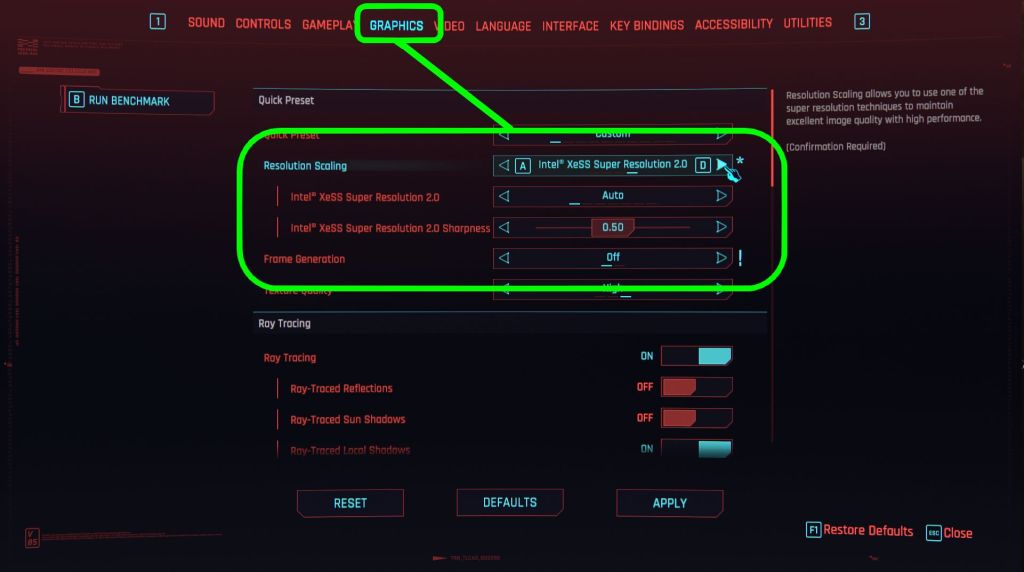
For optimal performance, test XeSS 2 at various resolutions. A minimum of 1080p (1920×1080) or higher is recommended to achieve the best visual and performance results.
Does XeSS 2 work only on Intel Arc graphics cards?
Intel recently released the XeSS 2.1 development kit, enabling this technology to run on graphics cards from other manufacturers, including AMD Radeon and NVIDIA GeForce. This compatibility extends beyond super resolution (XeSS-SR) to include frame generation (XeSS-FG) and low-latency optimization (XeLL). The feature is available for owners of NVIDIA GeForce GTX 1000 series (or newer) and AMD Radeon RX 5000 series (or newer) GPUs. The development kit is accessible on GitHub, empowering developers to integrate XeSS 2 across a broader range of hardware.
Source: Intel Gaming

The article contains an affiliate link to the G2A.com store. If you buy games through it, you will support the Tekknological.com. Thanks a lot!

Best split-screen games (part 1). Top picks for local coop
Here are the best split-screen games for great local multiplayer fun. You can play them on both consoles and PC. Split-screen mode is nothing more than a local multiplayer option, where each player in front of a monitor or TV has access to their own part of the screen. Split-screen mode can be used for…

Top 100 best local co-op games. Play together on one PC or console
Watch the video with the 100 best games, that can be played by two or more players in the same time on single PC or console. Games that enable local multiplayer mode allow several players to play at the same time without an internet connection. The type of local co-op depends on the game -…
GeForce RTX 5050 4K test: the cheapest Blackwell. Return of 8 GB GPUs
The NVIDIA GeForce RTX 5050 got hammered in early reviews and benchmarks. Critics called it underpowered (even versus previous-gen cards), complained about the mere 8 GB of VRAM, slammed the price, and generally treated it as a bit of a joke – the kind of card that makes people ask, “Who signed off on this?”.…



Leave a Reply