


Intel APO (Intel Application Optimization) is a technology that can speed up games by several percent. This is especially important for Intel Core Ultra processors (specifically Arrow Lake models, i.e., Core Ultra 200S), as their gaming performance has proven disappointing. APO also works on the latest Core Ultra 300 (Panther Lake) processors. You can check the list of supported models below.
Alongside the launch of the Core Ultra Plus processors, Intel also introduced a further improvement to APO through the implementation of the Intel BOT tool (Binary Optimization Tool), which we discuss in more detail below. However, this feature will only work on Core Ultra 200 Plus (Arrow Lake Refresh) and Core Ultra 300 (Panther Lake) processors.
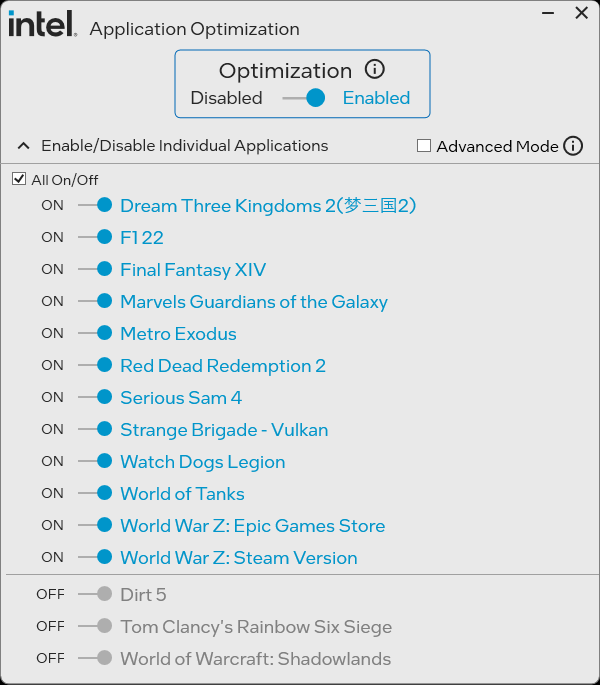
Intel Application Optimization controls application resources and optimizes thread scheduling in real time for selected titles. If the results do not meet expectations, users can disable Intel APO for all or selected applications. The Intel Application Optimizer user interface is an optional part of the technology and allows users to see which games are optimized and to disable optimizations for specific games.
So far, the list of supported titles is not very impressive, but more games will be supported by Intel Application Optimization with future updates. Owners of Intel Arc graphics cards can also use the Intel XeSS 3 technology to boost game performance. If your computer is equipped with an Intel processor and a GeForce graphics card, besides APO you can use DLSS 4 and if with a Radeon card – FSR 4 (Redstone) technology.
How Does Intel Application Optimization Work?
Intel Application Optimization will be enabled by default on a supported computer with Intel DTT (works in the background). Some computers may have Intel Application Optimization preinstalled by the motherboard manufacturer. Users can also install the Intel APO app to directly control optimization via the interface.
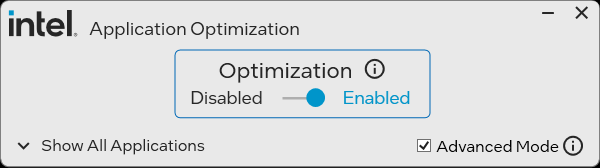
Advanced Mode in APO unlocks limited support for CPUs with 6 or more Performance (P) cores. All other CPUs with fewer than 6 “P” cores are currently not supported (even in advanced mode).
Advanced Mode in Intel Application Optimization allows users to see additional game titles that have not been verified for performance improvement by Intel. This means neither the processor nor the specific system configuration has been verified, and results may vary – including possible performance decrease. Users may choose to use Advanced Mode at their own risk.
Users with CPUs with limited support (Intel Core 12th, 13th, and 14th gen) can test Intel Application Optimization by enabling Intel DTT in BIOS. Then, they can unlock Advanced Mode and choose games available in the app.
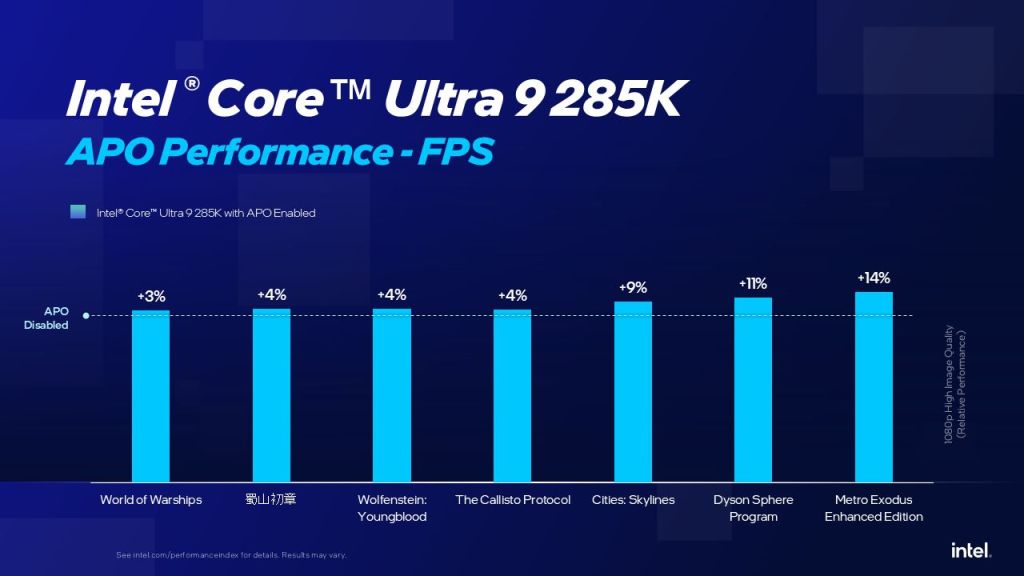
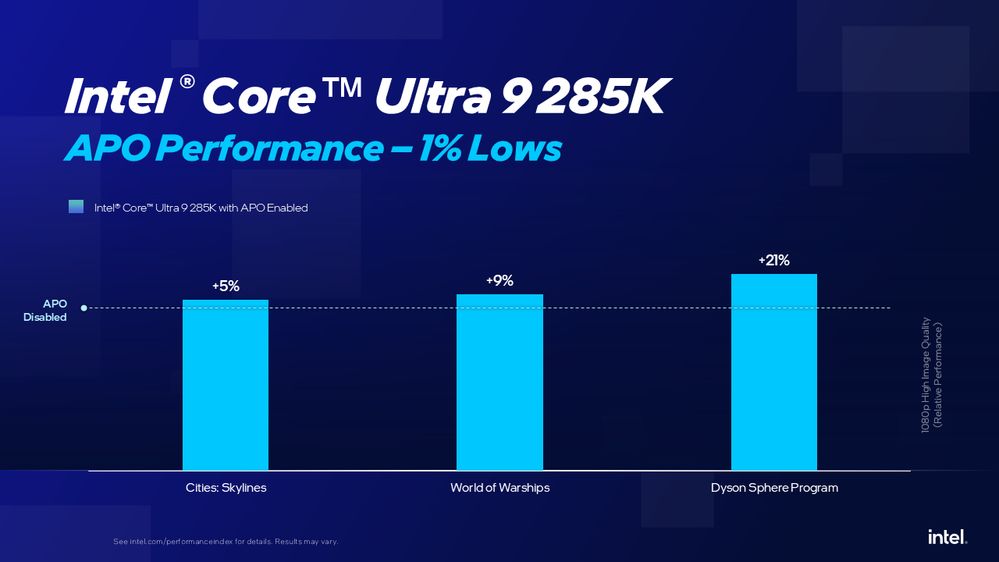
According to Intel, Intel APO can increase game speed from a few to several percent when it comes to average frames per second.
When it comes to minimum frames per second, results are even more promising – acceleration can even exceed 20%.
List of games compatible with Intel Application Optimization (APO):
- 7 Days to Die
- Assetto Corsa
- Baldur’s Gate 3
- Battlefield 1
- Cities Skyline
- Company of Heroes 3
- Counter-Strike: 2
- Cyberpunk 2077
- Delta Force: Black Hawk Down
- Deus Ex Mankind Divided
- Dirt 5
- Dota 2
- Dreams Three Kingdoms 2 (PRC)
- Dyson Sphere Program
- EA Sports FC 24
- F1 22
- Far Cry 5
- Far Cry New Dawn
- Final Fantasy XIV Endwalker
- God of War
- Guardians of the Galaxy
- It Takes Two
- Kerbal Space Program 2
- League of Legends
- Like a Dragon: Infinite Wealth
- Metro Exodus
- Metro Exodus Enhanced Edition
- Naraka: Bladepoint
- Red Dead Redemption 2
- Riftbreaker
- Resident Evil
- Serious Sam 4
- Shadow of the Tomb Raider
- Strange Brigade (VLK)
- The Callisto Protocol
- Tiny Tina’s Wonderlands
- Tom Clancy’s Rainbow Six Siege
- Total War: PHAROAH
- Total War: THREE KINGDOMS
- Total War: WARHAMMER 3
- War Thunder
- Watch Dogs: Legion
- Wolfenstein Youngblood
- World of Tanks
- World of Warcraft
- World of Warships
- World War Z
- 蜀山初章 (PRC)
The list of supported games may vary depending on configuration and graphics card. If a title is not visible in the Intel Application Optimization interface, it means it has not been verified for your system configuration. Users may choose to use Advanced Mode at their own risk, but Intel does not guarantee optimization in this mode.
Intel Binary Optimization Tool (Intel BOT)
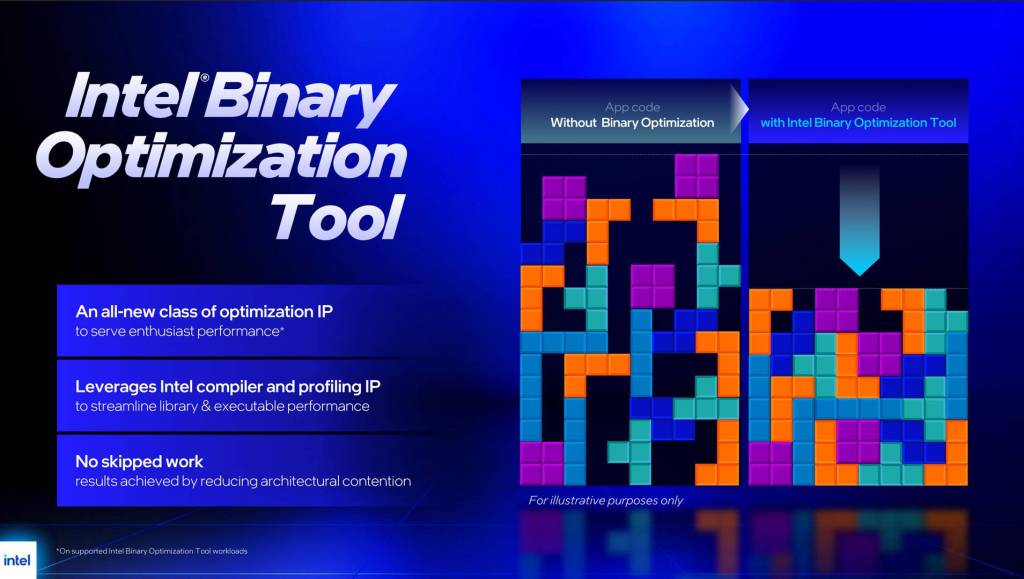
Intel BOT is the next evolution of APO, available exclusively on select processors (Core Ultra 200 Plus and Core Ultra 300).
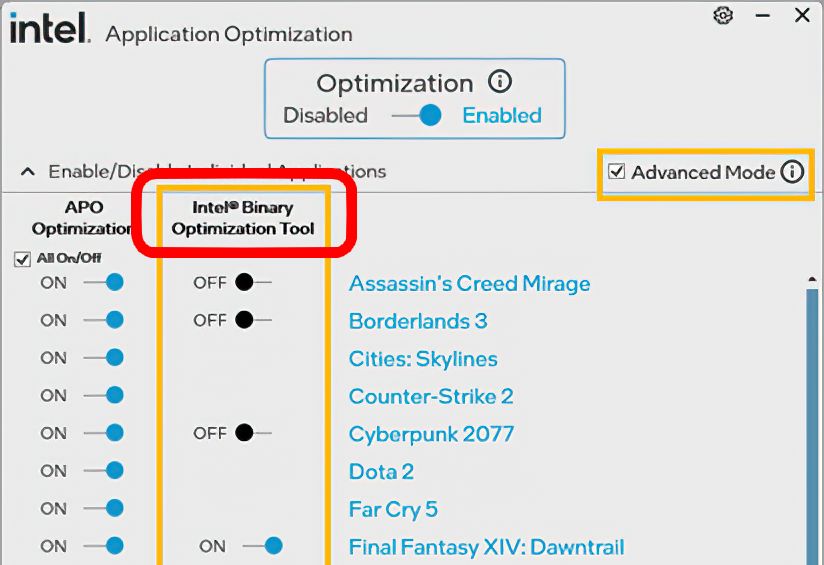
If you’re one of the lucky owners of these new CPUs, installing APO and switching to Advanced Mode unlocks the BOT tool.
This could be a game-changer. It requires zero effort from game developers, no patches or updates needed. BOT analyzes executable files in real-time to better leverage Intel CPU architecture, especially in games, by optimizing instruction flow, cache usage, and execution units – all without touching the source code.
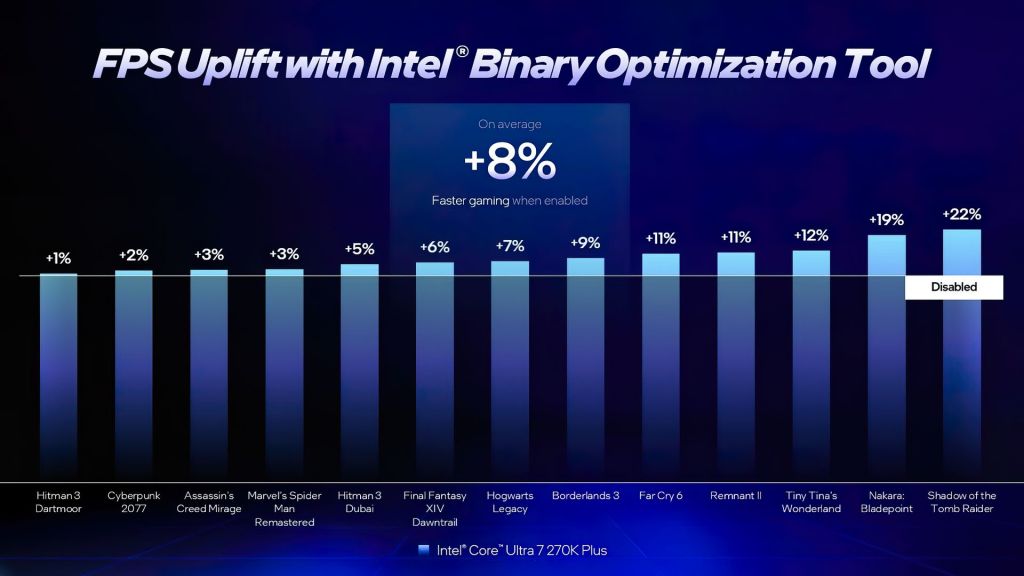
Expect around 8% average FPS gains in games – some titles see just 1% uplift, others up to 22%. Check the compatible CPU list below.
To use Intel BOT, grab the Intel Platform Performance Package.
FAQ
What are the requirements for Intel Application Optimization (APO)?
- Intel Core processors with at least six Performance (P) cores – detailed list below.
- Intel Dynamic Tuning Technology (Intel DTT) / Intel Platform Innovation Framework (Intel IPF) enabled in BIOS. Older systems may require manual enabling in the BIOS.
- Latest motherboard BIOS version.
- Windows 11 operating system.
Which desktop CPUs are compatible with Intel APO?
- Intel Core Ultra 9 285K
- Intel Core Ultra 7 265K
- Intel Core Ultra 7 265KF
- Intel Core Ultra 5 245K
- Intel Core Ultra 5 245KF
- Intel Core i9 14900KS
- Intel Core i9 14900K
- Intel Core i9 14900KF
- Intel Core i7 14700K
- Intel Core i7 14700KF
- Intel Core i5 14600K
- Intel Core i5 14600KF
Which mobile CPUs are compatible with Intel APO?
- Intel Core Ultra 9 386H
- Intel Core Ultra 7 365
- Intel Core Ultra 7 356H
- Intel Core Ultra 7 355
- Intel Core Ultra 5 335
- Intel Core Ultra 5 332
- Intel Core Ultra 5 325
- Intel Core Ultra 5 322
- Intel Core Ultra 9 285HX
- Intel Core Ultra 9 275HX
- Intel Core Ultra 7 265HX
- Intel Core Ultra 7 255HX
- Intel Core Ultra 5 245HX
- Intel Core Ultra 5 235HX
- Intel Core i9 14900HX
- Intel Core i7 14700HX
Which CPUs have limited APO support? (at least 6 P-cores)
- Intel Core Ultra 9, 7, 5 (desktop, series 2)
- Intel Core (series 2)
- 14th gen Intel Core (desktop and mobile)
- 13th gen Intel Core (desktop and mobile)
- 12th gen Intel Core (desktop and mobile)
Which CPUs are compatible with Intel BOT (Binary Optimization Tool)?
- Intel Core Ultra 5 Processor 250K Plus
- Intel Core Ultra 5 Processor 250KF Plus
- Intel Core Ultra 7 Processor 270K Plus
- Intel Core Ultra 9 processor 290HX Plus
- Intel Core Ultra 7 processor 270HX Plus
- Intel Core Ultra 5 Processor 322
- Intel Core Ultra 5 Processor 325
- Intel Core Ultra 5 Processor 332
- Intel Core Ultra 5 Processor 335
- Intel Core Ultra 7 Processor 355
- Intel Core Ultra 7 Processor 356H
- Intel Core Ultra 7 Processor 365
- Intel Core Ultra 9 Processor 386H
Source: Intel

The article includes an affiliate link to G2A.com. If you buy games using it, you support the operation of Tekknological.pl
GeForce RTX 5050 4K test: the cheapest Blackwell GPU in an era of sky‑high prices and the return of 8 GB graphics cards
The NVIDIA GeForce RTX 5050 got hammered in early reviews and benchmarks. Critics called it underpowered (even versus previous-gen cards), complained about the mere 8 GB of VRAM, slammed the price, and generally treated it as a bit of a joke – the kind of card that makes people ask, “Who signed off on this?”.…
This laptop took 912 bricks to build – watch the process
I got a brick set for Christmas, specifically a laptop you assemble from bricks. At first, I thought it was a simple kit that would take me no more than 15 minutes to complete, but I was very wrong. The set has more than 900 pieces, so it turned into a much longer, but very…

Best split-screen games (part 1)
Here are the best split-screen games for great local multiplayer fun. You can play them on both consoles and PC. Split-screen mode is nothing more than a local multiplayer option, where each player in front of a monitor or TV has access to their own part of the screen. Split-screen mode can be used for…

 Tekknological - your ultimate gaming destination
Leave a comment